AWS · Open source · No account required
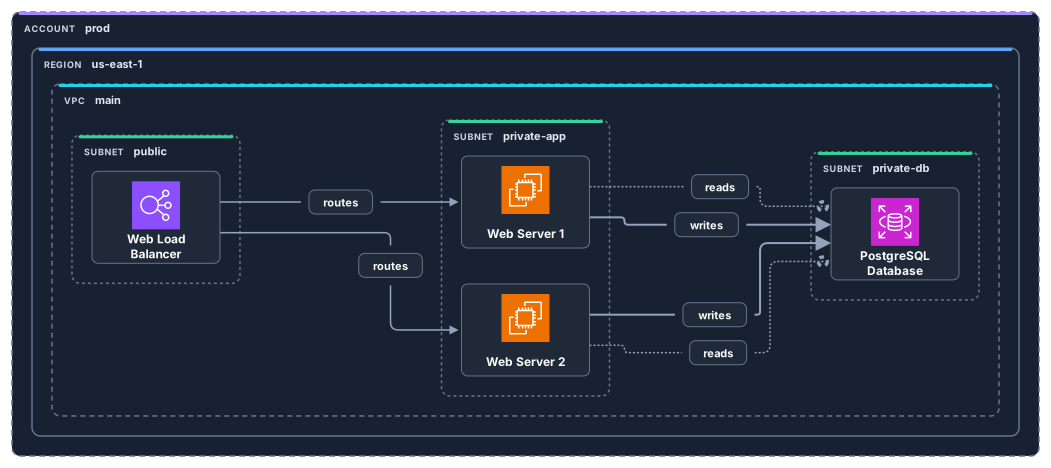
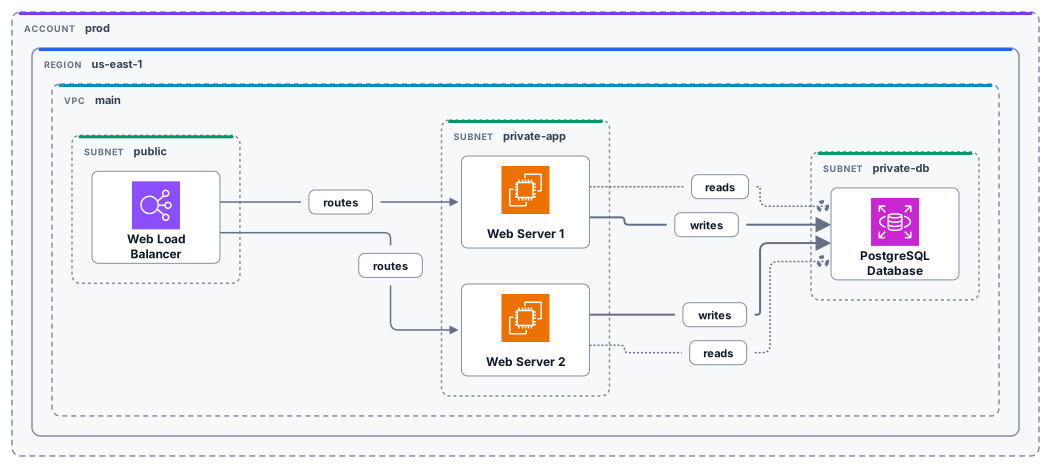
Describe your AWS architecture in a few lines of text. ArchLex validates placement and connections against its 194-service AWS catalog, then renders a clean SVG with official AWS Architecture Icons.
An Application Load Balancer in a public subnet, two EC2 web servers in a private subnet, and an RDS database in its own subnet, all inside one VPC.
provider aws
direction LR
validation normal

account prod {
  region us-east-1 {
    vpc main {
      subnet public {
        alb: alb["Web Load Balancer"]
      }

      subnet private-app {
        web1: ec2["Web Server 1"]
        web2: ec2["Web Server 2"]
      }

      subnet private-db {
        db: rds["PostgreSQL Database"]
      }
    }
  }
}

alb -[routes]-> web1
alb -[routes]-> web2
web1 -[reads]-> db
web1 -[writes]-> db
web2 -[reads]-> db
web2 -[writes]-> dbInstall the ArchLex skill or connect the MCP server, then ask Claude, Cursor, or Codex to diagram your AWS setup. The agent writes the source, ArchLex validates it, and you get back an SVG.
npx skills add baires/archlexPrefer MCP? Follow the MCP server guide.
Save the source as a .arch file and render it with the CLI, or call @archlex/core from Node.js or the browser.
npx @archlex/cli render three-tier.arch --direction LR --output three-tier.svgOpen source · MIT licensed